Writing a dog walking guide

Hollysdad

Administrator
Staff member
In the books I describe the routes using maps and text. Maps give the reader the opportunity to visualise the route and where they are, while the text gives the detail.

There are many different types of map, from simple route diagrams to maps that show the whole area in which the walk is located. Route diagrams are fairly easy to produce as they just show the path as a line, noting the features encountered along the way. Area maps take a lot more work to produce than route diagrams as every path and feature in the area needs to be mapped and accurately placed. The advantage of area maps is that they give the walker the opportunity to vary the route if necessary, for example if a path is closed for forestry work.

I decided that an area map would be the most useful format for the books. There were no useful maps that I could adapt. Ordnance Survey maps are copyright and the OpenStreetMap project, while free, would leave me with no control over content. Creating an area map required that I surveyed the areas and drew the maps myself. It would take longer but the resulting map would be tailored to the needs of the books.

Surveying the area and making maps was the longest, but most enjoyable, phase of writing the books. It needed lots of dog walks. Sometimes we got lost as paths had been moved or overgrown, sometimes we found unmarked paths to be explored. Holly loved it when the path disappeared and we had to go ‘off piste’. She showed a real talent for finding and following deer tracks through the undergrowth and getting us out of trouble.

The GPS app on my smartphone (A-GPS Tracker) made it fairly easy to record every walk. I’d just start recording at the car, walk the route, and stop recording when we’d finished. At the end of the walk I saved the track as a .GPX file and, when we got home, copy it to my PC. GPX files can be read straight into Google Earth (tools – GPS – import from file), producing an overlay on the terrain. After a few visits to an area I had a series of files that showed all the paths and tracks, just like the one below.
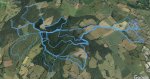
Kingswood.jpg

This shows a series of walks from our house, on the right, along Offa’s Dyke Path to Kingswood. It’s an area I plan to add to the new Gwent book. The blue lines cover about 34 miles of walking and show all the main paths through the woods. It’s easy to see the possibilities for circular walks.

Holly and I did surveys like this for every walk in each book, visiting each area several times to build up the network of paths. Walks were done in both summer and winter to check for muddy sections. The other day I added up all the GPS tracks; we walked over 1300 miles during the surveying phase of the two books.

Each walk was also an opportunity to take photos for the book. It’s no exaggeration that I took thousands of pictures for each book, and threw nearly all of them away. I found that the ones I kept tended to be the ones taken on sunny days. Spring and Autumn were particularly good times of year as the good light and colours provide interest. Surveying could be done in any weather but photography needed good light, so I started to plan walks around the weather forecast. If it looked like a nice day for photography I’d go to an area where I needed photos for the book.

All the surveying, mapping and photography took time. It took about a year to map the Wye and 18 months for the Forest of Dean.

In the next article I’ll start looking at methods for turning all this information into a map.
 

Hollysdad

Administrator
Staff member
In the previous article we saw how the routes were surveyed and turned into a Google Earth picture. Turning the Google Earth picture into a map is a nice job for a quiet evening when there’s nothing on the box.

I drew the maps using a (free) drawing package called Inkscape. The first step for producing the map was to open a new page in Inkscape and put the Google Earth picture as a background image. This provided a useful reference onto which the map could be drawn.

Using the ‘line’ tool in Inkscape I then traced over all the recorded roads and paths (the blue lines on the Google Earth Picture) to mark out where they lay. Inkscape makes it very easy to change colour, thickness and other line properties. Roads were reformatted as red lines, main forestry tracks were then formatted to show thick dotted lines overlaid in white, while the smaller paths were formatted as thin dotted lines.

Once the paths had been laid on the map, I used the line tool to mark the outline of the woods. This was formatted with green fill and edges, then sent to the back of the diagram so it didn’t hide the other detail.

The same line tool was used to mark out streams and ponds, which were coloured blue.

The last step was to add all the incidental detail such as symbols for car parks, campsites, radio masts, benches, viewpoints and other points of interest. Finally, a scale was added based on the distance between two known points on the ground.

Colouring makes a map more attractive, but carries the risk that the printed colour may not match the colour on screen. Printing the Wye Valley book I found that the printed colours were darker than on the computer screen. I chose a lighter colour pallete for the Forest of Dean book, which looked much better. I’m reformatting the Wye Valley maps into the new palette as part of the revision.

When most of the detail has been added the Google Earth image was no longer needed and was deleted, leaving a perfect map.

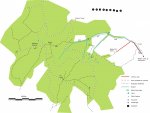
The current map of Kingswood is below. I still have a few edits to make, but it gives an idea of what a map can look like. It took about 90 minutes to create this map in Inkscape.

Kingswood V3.jpg

Having drawn the map it was necessary to check it for accuracy on the ground. Usually there are a few small errors, for example the angle at which paths join. I corrected the map by walking the route with the printed map and pencilled any changes straight onto it. It’s another dog walk to be enjoyed. It’s a quick job to update the map after each walk.

For the IT experts among you, I’ve found very useful is to save the printed version of the map as a vector graphics rather than raster graphics. This allows the maps to be resized without becoming grainy. Mostly I save each map as a PDF as it can be easily imported into a book, and is a vector graphic format.

Once the maps were created the SW pack acted as guinea pigs and tried out some of the walks, and were very useful at grading them. Thank you folks!

The creation of the maps is a huge milestone in writing the book. Maps are like the plot of a novel; they set the framework for each chapter. The next stage is to write the words around the map.

Next week I’ll cover the business of preparing and writing text, putting the book together, and publishing the finished product.

If anyone has a question on this week's articles then feel free to ask.
 

Hollysdad

Administrator
Staff member
I once saw a T-shirt that said ‘I sometimes wonder what happened to the people who asked me for directions’. This should be in a frame above the desk of everyone who tries to write a walking book, after all, the person buying the book is paying you to give them directions.

The directions given by the map and the text are the essence of the book. They need to be accurate and agree with each other. The reader will be confused if the map shows the track bending left and the text says it bends right.

Sometimes the reader will get lost. This could be due to and error by the reader, or maybe a change on the ground that occurred after the book was published. The text needs to help readers to realise that they are lost before travelling too far.

In the two books I broke each walk into short sections that started and finished at a waypoint. Waypoints are the points on the walks at which something changes, for example a path junction. Telling the reader to turn right at a large tree is no help if the tree is cut down, so an ideal waypoint will have two or three distinguishing features. In between way points the walker can plod happily along enjoying the scenery.

The map in the previous article shows some numbered black dots along the top of the map. I use these to denote waypoints by dragging and dropping them onto the map.

Over two books I’ve developed a method getting the text right. After producing the map I walk the whole route with the map and my smartphone. I use the phone as a voice recorder, and I record every detail of the route. I mean EVERY detail: what the ground is like, the steepness of the path, interesting features like trees and signposts, how the path bends, what path junctions look like, bridges, culverts, benches and anything that could contribute to the text.

I make a recording at every numbered waypoint as I reach and depart it. As an example, this is a recording from one of the walks:

‘…. Point three is approached along a level track with pinewoods on the left and mixed woodland on the right. Arriving at point three I can see a fork in the track with a large oak tree on the left. The right hand fork stays level and is a small path that goes 20 degrees right of straight. The left hand fork is about 45 degrees left of straight and goes slightly uphill on a wide gravel track. The route from point three takes the right fork….’.

Recording everything on the phone is very useful, but occasionally embarrassing if someone sees me talking to myself. I’ve had a few strange looks over the years.

When I get home, and while its fresh in my mind, I transcribe all these comments onto the PC. After a few minutes typing I have a file that contains a huge amount of detailed information about the walk, usually more than I need.

I’ve got a map, I’ve taken lots of pictures, and I’ve recorded a detailed route description. The next thing is to sort all the material into a chapter. I’ll look at that in the next article.
 

Hollysdad

Administrator
Staff member
The notes, photographs and the map are now ready, so its time to turn them into a chapter.

Writing a chapter is not simply a matter of typing text. The chapter needs to be laid out so that it looks attractive. Every chapter needs to have a similar structure and layout, giving the book its distinctive style.

The selection and placement of pictures can help to tell the story. If there is a viewpoint or important feature on the walk then it can be helpful to whet the reader’s interest with a picture of it. A picture of Holly doing something enjoyable on the walk can sometimes help to 'sell' the walk. I rarely included people in the pictures as the book is about Holly and the walk, not about me. After a long chat with Ruth we decided that each book should contain just one picture of me so that lost walkers knew who to blame!

One lesson I learned very early is that word processors like Microsoft Word struggle with large texts. Word processors are general purpose programs and can do many clever things, but are not optimised to writing books. I tend to use TeX based document editors as these are purpose-designed for writing books and reports. Unlike word processors the formatting is applied at the end when the book is compiled, ensuring that formatting is consistent across the whole book. Tex takes a little time to learn, but once learned its faster and more reliable than word processors.

All chapters need to have the same ‘feel’ so a similar writing style is important. I found that I had a tendency to change tense between chapters, some being imperative (‘do this’) and some in the past tense (‘I did this’). By the time I wrote the Forest of Dean book I was aware of this tendency. The current revision of the Wye Valley book is intended to address some of these stylistic inconsistencies.

A final point is that chapters should start on the right-hand page, have an even number of pages, and finish at least half way down a left hand page. Sometimes this requires a bit of padding, for example an additional picture or stretching the text. Occasionally I’ve had to prune a chapter to get the page alignment right. It’s easier to add a picture than to remove text.

With all this guidance, how did I write a chapter?

In the two books I structured each chapter as five sections, giving all chapters a consistent layout and feel. The structure I chose was:
  • Top matter (heading, walk distance and grade)
  • Walk description (a paragraph to ‘sell’ the walk)
  • How to get to the start of the walk (car parks, buses etc)
  • Description of the walk, including pictures.
  • The map - on its own page so it doesn’t get squashed by the text
I start by placing all the top matter and headings for the three sections: Walk description, how to get there and route description. After the headings I set any pictures I want to use in the chapter. Finally I force a page break and set the map. This gave a ‘shell’ that I could type into.

Having laid out the chapter it was time to type.

All those transcribed notes that I described in the last article need to be turned into coherent sentences and linked to the waypoints on the map. I usually find that this is quite straightforward as, most of the time, it’s just a matter of pasting in the text file and editing it. Using the example from the previous article:

‘..A pleasant walk through the woods on a good track leads to the fork at point 3. After admiring the huge oak tree, take the right hand fork onto a small path…’.

All the essential information is there: how to recognise point 3 and how to leave it. The text had been reduced to about one third of the length of my dictated notes.

A tip: The black numbered circles on the map are used to show waypoints. They are actually a symbol in some typefaces, so its easy to use the same symbol on the map and in the text.

The next article will explain how I pull all these chapters together into a book.
 

Hollysdad

Administrator
Staff member
We now reach the final stage of the writing process, turning all the chapters into a book. This is where Tex-based text editors score very highly. I started using a Tex editor called ‘LaTeX’ as a student, and have used it for books, reports, and other projects ever since.

Books don’t just contain chapters, they have a lot of additional material called ‘front matter’, sometimes called ‘preliminaries’ or ‘prelims’. The front matter typically comprises:

  • Title page *
  • Copyright statement
  • Dedication *
  • Acknowlegments
  • Table of Contents *
  • Introductory Chapter *
  • Walk Location Map
The items marked with a * need to go on right hand pages. The other items can go on left or right hand pages.

Tex allows everything to be written as separate files so I have a file for front matter and one for each chapter. I can then write an overarching Tex File that assembles and formats the whole book in a print-ready form. This file will basically contain:
  • Formatting information for the whole book (fonts, paper size, margins, page numbering rules for hyphenating words etc)
  • A list of files to be used in the book, in the order they are to be used (front matter, chapters)
Running the Tex compiler automatically generates the book file, inserts picture and map files, and populates the table of contents. I can see what the finished book will look like in one step.

Sometimes a chapter runs onto an odd number of pages, forcing all subsequent chapters to start on a left-hand page. In the Forest of Dean book I started inserting ‘information’ pages to restore the correct order. One was a map of the old tramways that form the backbone of the cycle trail, another was pictures of birds and mammals encountered on the walks. I intend to use the same trick on the revised Wye Valley book.

The last thing to be produced is the cover. The cover needs to be big enough to include the front, spine and back as one piece. Most publishers will tell you how thick the book will be and hence the thickness of the spine. The front and back covers need to be slightly bigger than the paper size so that any slight errors in cutting the cover don’t result in blank edges to the cover.

I looked at a lot of covers online to get inspiration, and decided on a glossy card cover with pictures of Holly. Each cover had a solid background colour which spilled about 1/8 inch over the edge of the cover to allow for cutting errors.

At this point I gave trusted friends a copy of the book and cover files so they could proof read it. They came back with a few errors that I corrected before submitting it for publication.

With the book file and cover file compiled it was time to publish the book. The next and final article will explain the publication process.
 

Hollysdad

Administrator
Staff member
And so we come to the last article in the series: The publishing process.

There are quite a few publishers offering print on demand (POD) services. I decided to go with Kindle Direct Publishing (KDP), a subsidiary of Amazon. This meant that the book could appear on Amazon across the world. Their royalties for POD were not the best, but their reach was outstanding.

KDP is run out of America so all the sales are in dollars. Furthermore, the sales are subject to American taxes. The first step of setting up a KDP account is to register with the American tax services (IRS) and inform them that I pay my taxes in the UK. This means that they waive the 30% income tax that they would charge American authors and pay the untaxed royalties into my bank account. KDP has automated this process so it’s fairly straightforward and only took a few days to set up, most of which was waiting for the IRS.

Having done that necessary bit of admin I could start the publication process.

Step 1 was to upload the book and cover for format checking. I selected the paper size and quality, cover type and other information then uploaded my file and cover. After 24 hours they came back and confirmed that the dimensions and format were correct and opened a soft copy of the final book for me to review. They also offered to sell me (at cost) a paper copy. I decided to get one, but then found that proof copies were printed in the USA and I’d have to wait a few weeks for it to arrive. Why they can print books in Europe, but only print proof copies in the USA is one of life’s little mysteries!

Having proofed the copy I got to step 2. I had to decide where I wanted the book advertised, and how it was to be priced. Amazon tells you how much they will charge to print the book, so my royalties are the difference between their charges and the price I set. I opted for UK, American and European distribution, and set prices in Pounds, Dollars and Euros. Over the years I’ve made minor revisions to the prices to allow for exchange rates.

Step three was to write all the blurb about the book that would appear on Amazon. I kept it simple and just used the text from the back cover. For the Forest of Dean book I got a bit more adventurous and let people have a look inside the book.

The final step was to release the book for publication. I released the Wye Valley book on 1 July 2016, and it appeared on Amazon a couple of days later. It was a wonderful moment.

Apart from the niggle of having proof copies printed in the USA and sent by sea, I’ve found the KDP experience to be quite positive. I get a monthly report by email to let me know how much they’ve paid into my account that month (in pounds). I can log on to them anytime to generate reports about sales, which makes the tax return very easy. Interestingly, I’ve had a few sales into Europe and the USA though the majority of buyers are in the UK.

I’ve yet to update a book. It looks like I have to remove the current edition then upload the new one. Other authors in the group say that there’s a two-week gap between taking one edition down and a new one appearing, but I’ll just have to see how that goes.

So what next? The never-ending process of revisions will continue once the COVID lockdown is lifted. Holly and I will be back out checking the Wye Valley walks for the second edition. After that we hope to start the surveying and mapping for the Gwent book, the third and last in the series, before revising the Forest of Dean book.

So to wrap up, what have I learned from writing these two books?

I learned that the big decisions should be made early in the process and not deferred. The decision to produce a colour pocket book of about 12 walks gave me a clear target to aim for. I knew that I would need maps and photographs. I knew that I would need to survey the ground so developing a survey method was important. It also gave me a way of measuring progress as each completed chapter represented about 8% of the complete book.

I also learned that writing a book is mainly about preparation and very little about writing. Most of the effort went into deciding the routes and surveying. Producing the actual maps and text was relatively easy.

Finally, I learned that Holly is a prima donna. Asking her to pose for a picture is a guarantee that she’ll stick her nose into an interesting smell. When she finally did pose a cloud would come over and ruin the light. I had to get sneaky to get some of the pictures.

I hope that folks have found these articles interesting. If you have any questions I’d be happy to try and answer them.
 
I have found the whole process enlightening so thank you . I`ve often been asked to write a book on our ten years living in France which includes hilarious renovation projects plus living and working in a chateau , but the subject matter has been done to death . It sounds like yours has been a labour of love Phil , thanks again x
 
Why didn't you choose a local printer? Just asking out of interest. My friend and her husband have a small printing firm, just 4 of them and I know they put the books on Amazon.

It does look like hard work but very enjoyable. Me OH did the laying out and restored the old photographs for the local history of our village, it was a group book, 2 in fact and not printed by my friend!
 

Hollysdad

Administrator
Staff member
Why didn't you choose a local printer? Just asking out of interest. My friend and her husband have a small printing firm, just 4 of them and I know they put the books on Amazon.
I looked at using local printers. I'd have to decide how many to print, with the risk that I'd buy a load of copies and find that no-one wanted to buy the book. Print on demand took away that risk, removed the publishing costs and solved all the marketing problems all in one go. I think its the future for small runs of books like this.
 
I don't have your books, sorry, as I don't think I'll ever walk my dogs in your areas but I have a question. Do you have sections on how much Holly enjoys these walks? Does she go after the sniffs? Does she trot at your side? Will she get excited and go silly? I am sorry to ask but as a mum to fur kids these are what I'd look for and I'm sure Holly would too. :nod:
 

Hollysdad

Administrator
Staff member
Rather than grade each walk by how much Holly enjoys them, I try to find walks that she enjoys.

For example, there are loads of paths through the Forest of Dean. The wider tracks are a bit stony (rougher on paws), have more litter (opprtunity for scavenging) and are frequented by cyclists (might have to put her on a lead). Holly tends to go into autoplod on those paths as she finds them really boring. I try to pick the paths where there are things that would stimulate her (lots of different sniffs, tree stumps, water, long grass, places to play etc). Holly seems to come alive, trotting ahead or dropping back to investigate things, finding water to splash in.
 
Top